 FamKnit
Notifications & reminders
The bell
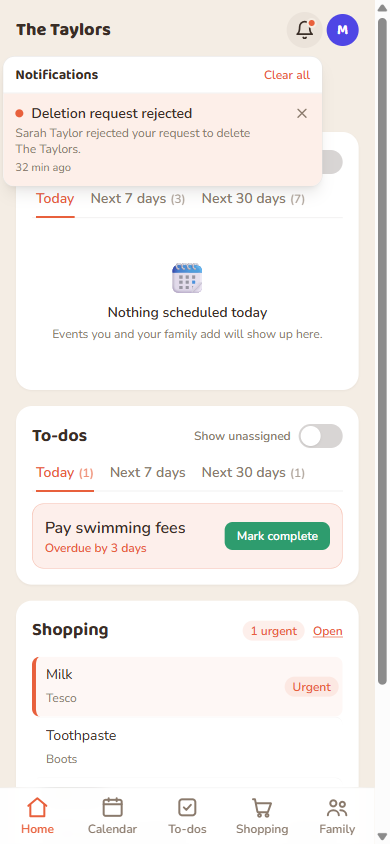
The bell icon in the header shows an in-app feed of things that concern you: a task assigned to you, a new shared event, a scheduling clash, someone approving or rejecting a family-deletion request, and so on. Some notifications (like a family-deletion request) have Approve/Reject buttons right in the dropdown, no need to navigate anywhere.
Your preferences
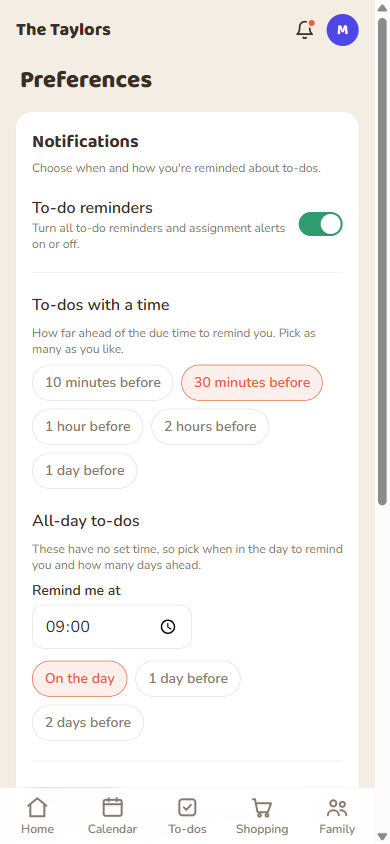
Open Preferences from your avatar menu. Everything here is per-person, not per-family.
| Setting | What it controls |
|---|---|
| Master toggle | Off turns off all reminders and notifications for you, everywhere. On (default) lets everything below apply. |
| Channel | Push, email, or both: how reminders actually reach you. |
| Timed to-do reminders | How far ahead of a specific due time you're reminded (e.g. 30 minutes before). |
| All-day to-do reminders | A time of day (default 09:00) plus how many days before the due date (default: the day itself). |
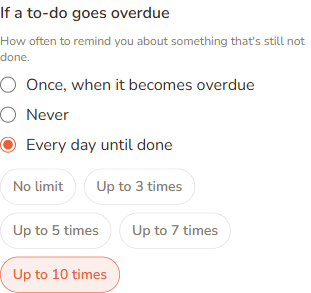
| If a to-do goes overdue | How often you're re-reminded about something that's still not done: once (default), never, or every day until it's checked off. |
| Quiet hours | A window (e.g. 22:00–07:00) where non-urgent reminders wait until morning instead of arriving overnight. |
If a to-do goes overdue
By default, an overdue to-do reminds you exactly once, the moment it crosses its due time. If that's not enough (or too much), Preferences has two other options:
- Never: skip the overdue nudge entirely for that to-do.
- Every day until done: re-reminds you once a day, at your all-day reminder time, until you check it off, delete it, or an optional limit (3, 5 or 7 times) is reached.
The daily nudge uses the same time of day as your all-day to-do reminders above, so there's only one time to set. Reactivating a to-do (marking it not done again) starts the count over.
Turning on push notifications
Push is opt-in per device. FamKnit never prompts you automatically. Turn it on from the Preferences page when you're ready; you'll need to do this again on each new device or browser.
If you use a paired watch, notifications that reach your phone reach your watch too. The one thing to watch for: the first time you open the FamKnit watch app it asks whether to allow notifications, and saying no switches them off on the watch. See Connected apps and devices.
When reminders actually arrive
| Reminder type | Respects quiet hours? |
|---|---|
| To-do reminders | Yes, deferred until quiet hours end, never dropped. |
| Event reminders | No, always fires on time, even overnight, since delaying it could mean it arrives after the event already started. |