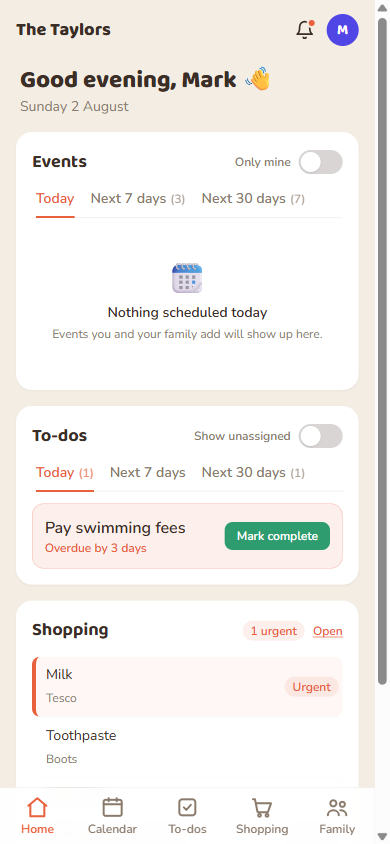
Home is the screen you land on after signing in. It has three cards: Events, To-dos, and Shopping, each a quick summary rather than the full list (open Calendar/To-dos/Shopping from the bottom nav for everything).
The Home dashboard, Today tab: Events, To-dos, and Shopping cards.
The Today / Next 7 days / Next 30 days tabs
The Events and To-dos cards both use the same three time windows. They don't overlap:
Tab
What it shows
Today
Anything due or happening today, plus anything overdue, pinned at the top.
Next 7 days
Days 1 through 7 from today. Today's items aren't repeated here.
Next 30 days
Days 8 through 30 from today.
Good to know:These buckets are worked out on your own device, in your own time zone, not the server's. An all-day event or task buckets by its date, never by a specific time.
Events card — “Only mine”
Setting
What you see
Off (default)
Every event you're allowed to see: the whole family's shared calendar, plus anything private you're tagged on.
On
Only events where you're personally tagged. Creating an event, or a child being tagged on one, doesn't count as “yours” on its own.
This is a display filter only. It never changes who gets reminded about anything. A child's event still reminds the adults responsible for them even if this toggle hides it from your card.
To-dos card — “Show unassigned”
Setting
What you see
Off (default)
Only to-dos assigned to you.
On
Also pulls in to-dos nobody's claimed yet, so you can see what's up for grabs.
Shopping card
No toggles here. It just shows what still needs buying, most urgent first, with a count. Tap “Open” to go to the full Shopping list.
 FamKnit